


享元模式 Flyweight Pattern
1777 字
9 分鐘
享元模式 Flyweight Pattern
目的
以共享機制有效地支援一大堆小規模的物件。
適用
Flyweight模式是否有效,端看如何使用、用在何處。請在以下條件全都成立時才考慮使用:
- 當應用程式使用了一大堆物件時。過多物件耗用過多空間時。物件的大部份狀態都可歸為外在狀態時,即:需要時才顯現出來(On Demand)。如果將外在狀態拿掉,就能將好幾群物件換成少數幾個共用物件時。如果應用程式不依賴「物件等同性質」時( object.equals() )。因為flyweight物件在觀念上會視為是同個物件。
結構及成員
Collaborations:
Flyweight 運作所需要狀態必須訂為內在(intrinsic)或外在(extrinsic)。內在狀態乃直接存於 ConcreteFlyweight 物件中,外在狀態則由Client物件計算或儲存,並在必要時將它遞給 Flyweight。
Client 不應直接具現出 ConcreteFlyweight,必須透過 FlyweightFactory 物件來取得,以確保有被妥善共用。
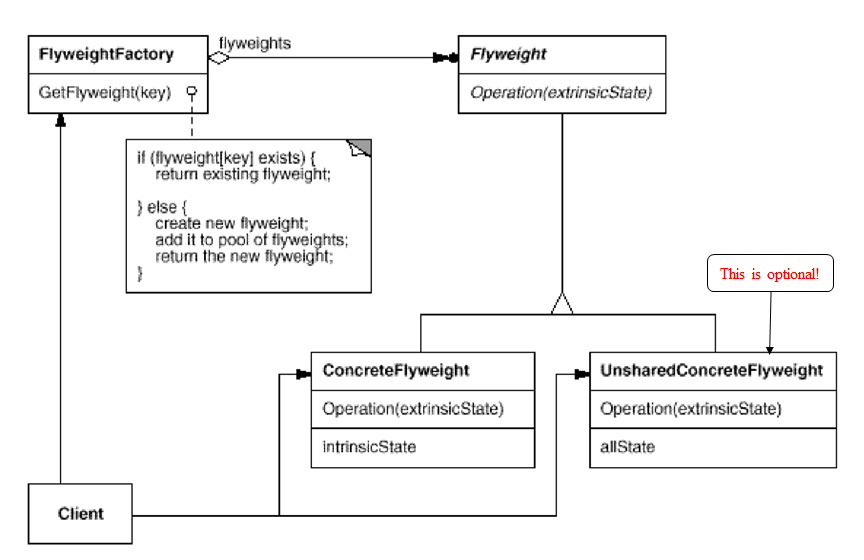
- Flyweight:宣告存取外在狀態的介面。ConcreteFlyweight: like the Character具體實作出Flyweight介面。此物件必須是可共用的,所存的狀態必須是內在狀態,並且與所處環境無關。UnsharedConcreteFlyweight: like the Row, Column並非所有Flyweight子類別都得共用,Flyweight介面只是提供這樣的可能,而非強制。在物件結構的某一層次(如:Row、Column)常會利用UnsharedConcreteFlyweight物件包含其他的ConcreteFlyweight物件。FlyweightFactory:建立及管理 Flyweight 物件。確保 Flyweight 物件被妥善共用。當 Client 要求一個 Flyweight 物件時,Flyweight物件會給他既存的一個,如果還沒有,就建一個新的。Client:持有指向一個或多個 Flyweight 物件的指標。計算或儲存 Flyweight 的外在狀態。
影響結果
好處
- 允許我們能夠建立大量的虛擬物件。減少記憶體佔用並加快代碼速度。該Pattern簡化了代碼。我們可以透過結合Composite、Singleton、Visitor、和其他Pattern來建立非常優雅的代碼。
壞處
- 搜尋、傳輸和計算外在狀態時,可能會產生Run-time的負擔。
實作
移除外在狀態
- 如果在共用物件之前早就有許多各式各樣的外在狀態,即使移掉他們也無法省下多少空間。理想情況下,可用另一個所需空間不大的物件結構來計算外在狀態。
管理共用物件
- 因為物件需要共用,所以外界不應該直接實體化他們,應該用FlyweightFactory取得特定的物件來用。FlyweightFactory通常會用關聯式容器(Associative Store)(如:Map)來檢索想要的Flyweight物件。
Flyweight Pattern與Singleton Pattern相反: Flyweight:需要建立某個Class的多個實例。 Singleton:需要建立某個Class的最多一個實例。
Example: Shape
Class: Shape
package shape;
public interface Shape {
public void draw();}Class: Circle
package shape;
public class Circle implements Shape{
private String color; private final int x = 10; private final int y = 20; private final int radius = 30;
public Circle() {
}
public Circle( String color ) { this.color = color; }
public String getColor() { return color; }
public void setColor( String color ) { this.color = color; }
@Override public void draw() { System.out.println(this+" : Circle: Draw() [Color : " + color + ", x : " + x + ", y :" + y + ", radius :" + radius); }}Class: ShapeFactory
package shape;import java.util.*;
public class ShapeFactory {
private static final HashMap shapeMap = new HashMap();
public static Shape getShape( String shapeType ) { Shape shape=null; if( shapeType.equalsIgnoreCase("circle") ) { shape = (Circle) shapeMap.get("circle");
if( shape == null ) { shape = new Circle(); shapeMap.put("circle", shape); System.out.println("Creating circle object without any color in shapefactory : " + shape + "\n"); } } return shape; }}Class: FlyweightPatternDemo
package shape;public class FlyweightPatternDemo { private static final String colors[] = { "Red", "Green", "Blue", "Orange", "Black" };
public static void main( String[] args ) {
System.out.println("\n################ Red color Circles ####################"); for( int i = 0; i < 10; ++i ) { Circle circle = (Circle) ShapeFactory.getShape("circle"); circle.setColor(colors[0]); circle.draw(); } System.out.println("\n############### Green color Circles ####################"); for( int i = 0; i < 10; ++i ) { Circle circle = (Circle) ShapeFactory.getShape("circle"); circle.setColor(colors[1]); circle.draw(); } System.out.println("\n################ Blue color Circles ####################");
for( int i = 0; i < 10; ++i ) { Circle circle = (Circle) ShapeFactory.getShape("circle"); circle.setColor(colors[2]); circle.draw(); } System.out.println("\n################ Orange color Circles ####################"); for( int i = 0; i < 10; ++i ) { Circle circle = (Circle) ShapeFactory.getShape("circle"); circle.setColor(colors[3]); circle.draw(); } System.out.println("\n################ Black color Circles ####################"); for( int i = 0; i < 10; ++i ) { Circle circle = (Circle) ShapeFactory.getShape("circle"); circle.setColor(colors[4]); circle.draw(); } }}Result:
################ Red color Circles ####################Creating circle object without any color in shapefactory : shape.Circle@15db9742
shape.Circle@15db9742 : Circle: Draw() [Color : Red, x : 10, y :20, radius :30shape.Circle@15db9742 : Circle: Draw() [Color : Red, x : 10, y :20, radius :30shape.Circle@15db9742 : Circle: Draw() [Color : Red, x : 10, y :20, radius :30shape.Circle@15db9742 : Circle: Draw() [Color : Red, x : 10, y :20, radius :30shape.Circle@15db9742 : Circle: Draw() [Color : Red, x : 10, y :20, radius :30shape.Circle@15db9742 : Circle: Draw() [Color : Red, x : 10, y :20, radius :30shape.Circle@15db9742 : Circle: Draw() [Color : Red, x : 10, y :20, radius :30shape.Circle@15db9742 : Circle: Draw() [Color : Red, x : 10, y :20, radius :30shape.Circle@15db9742 : Circle: Draw() [Color : Red, x : 10, y :20, radius :30shape.Circle@15db9742 : Circle: Draw() [Color : Red, x : 10, y :20, radius :30
############### Green color Circles ####################shape.Circle@15db9742 : Circle: Draw() [Color : Green, x : 10, y :20, radius :30shape.Circle@15db9742 : Circle: Draw() [Color : Green, x : 10, y :20, radius :30shape.Circle@15db9742 : Circle: Draw() [Color : Green, x : 10, y :20, radius :30shape.Circle@15db9742 : Circle: Draw() [Color : Green, x : 10, y :20, radius :30shape.Circle@15db9742 : Circle: Draw() [Color : Green, x : 10, y :20, radius :30shape.Circle@15db9742 : Circle: Draw() [Color : Green, x : 10, y :20, radius :30shape.Circle@15db9742 : Circle: Draw() [Color : Green, x : 10, y :20, radius :30shape.Circle@15db9742 : Circle: Draw() [Color : Green, x : 10, y :20, radius :30shape.Circle@15db9742 : Circle: Draw() [Color : Green, x : 10, y :20, radius :30shape.Circle@15db9742 : Circle: Draw() [Color : Green, x : 10, y :20, radius :30
################ Blue color Circles ####################shape.Circle@15db9742 : Circle: Draw() [Color : Blue, x : 10, y :20, radius :30shape.Circle@15db9742 : Circle: Draw() [Color : Blue, x : 10, y :20, radius :30shape.Circle@15db9742 : Circle: Draw() [Color : Blue, x : 10, y :20, radius :30shape.Circle@15db9742 : Circle: Draw() [Color : Blue, x : 10, y :20, radius :30shape.Circle@15db9742 : Circle: Draw() [Color : Blue, x : 10, y :20, radius :30shape.Circle@15db9742 : Circle: Draw() [Color : Blue, x : 10, y :20, radius :30shape.Circle@15db9742 : Circle: Draw() [Color : Blue, x : 10, y :20, radius :30shape.Circle@15db9742 : Circle: Draw() [Color : Blue, x : 10, y :20, radius :30shape.Circle@15db9742 : Circle: Draw() [Color : Blue, x : 10, y :20, radius :30shape.Circle@15db9742 : Circle: Draw() [Color : Blue, x : 10, y :20, radius :30
################ Orange color Circles ####################shape.Circle@15db9742 : Circle: Draw() [Color : Orange, x : 10, y :20, radius :30shape.Circle@15db9742 : Circle: Draw() [Color : Orange, x : 10, y :20, radius :30shape.Circle@15db9742 : Circle: Draw() [Color : Orange, x : 10, y :20, radius :30shape.Circle@15db9742 : Circle: Draw() [Color : Orange, x : 10, y :20, radius :30shape.Circle@15db9742 : Circle: Draw() [Color : Orange, x : 10, y :20, radius :30shape.Circle@15db9742 : Circle: Draw() [Color : Orange, x : 10, y :20, radius :30shape.Circle@15db9742 : Circle: Draw() [Color : Orange, x : 10, y :20, radius :30shape.Circle@15db9742 : Circle: Draw() [Color : Orange, x : 10, y :20, radius :30shape.Circle@15db9742 : Circle: Draw() [Color : Orange, x : 10, y :20, radius :30shape.Circle@15db9742 : Circle: Draw() [Color : Orange, x : 10, y :20, radius :30
################ Black color Circles ####################shape.Circle@15db9742 : Circle: Draw() [Color : Black, x : 10, y :20, radius :30shape.Circle@15db9742 : Circle: Draw() [Color : Black, x : 10, y :20, radius :30shape.Circle@15db9742 : Circle: Draw() [Color : Black, x : 10, y :20, radius :30shape.Circle@15db9742 : Circle: Draw() [Color : Black, x : 10, y :20, radius :30shape.Circle@15db9742 : Circle: Draw() [Color : Black, x : 10, y :20, radius :30shape.Circle@15db9742 : Circle: Draw() [Color : Black, x : 10, y :20, radius :30shape.Circle@15db9742 : Circle: Draw() [Color : Black, x : 10, y :20, radius :30shape.Circle@15db9742 : Circle: Draw() [Color : Black, x : 10, y :20, radius :30shape.Circle@15db9742 : Circle: Draw() [Color : Black, x : 10, y :20, radius :30shape.Circle@15db9742 : Circle: Draw() [Color : Black, x : 10, y :20, radius :30文章分享
如果這篇文章對你有幫助,歡迎分享給更多人!
享元模式 Flyweight Pattern
https://linziyou.info/posts/2020-11-03-享元模式-flyweight-pattern/ 最後更新於 2020-11-03,距今已過 1965 天
部分內容可能已過時